
201 lines
8.4 KiB
Markdown
201 lines
8.4 KiB
Markdown
# cloud.common
|
|
|
|
This collection is a library for the cloud modules. It's the home of the following component:
|
|
|
|
- ansible_turbo.module: a cache sharing solution to speed up Ansible modules
|
|
|
|
More content may be included later.
|
|
|
|
# Requirements
|
|
|
|
- ansible_turbo.module requires Python 3.6 and Ansible 2.9 or greater.
|
|
|
|
## Ansible Turbo Module
|
|
|
|
### Current situation
|
|
|
|
The traditional execution flow of an Ansible module includes
|
|
the following steps:
|
|
|
|
- Upload of a ZIP archive with the module and its dependencies
|
|
- Execution of the module, which is just a Python script
|
|
- Ansible collects the results once the script is finished
|
|
|
|
These steps happen for each task of a playbook, and on every host.
|
|
|
|
Most of the time, the execution of a module is fast enough for
|
|
the user. However, sometime the module requires an important
|
|
amount of time, just to initialize itself. This is a common
|
|
situation with the API based modules. A classic initialization
|
|
involves the following steps:
|
|
|
|
- Load a Python library to access the remote resource (via SDK)
|
|
- Open a client
|
|
- Load a bunch of Python modules.
|
|
- Request a new TCP connection.
|
|
- Create a session.
|
|
- Authenticate the client.
|
|
|
|
All these steps are time consuming and the same operations
|
|
will be running again and again.
|
|
|
|
For instance, here:
|
|
|
|
- `import openstack`: takes 0.569s
|
|
- `client = openstack.connect()`: takes 0.065s
|
|
- `client.authorize()`: takes 1.360s
|
|
|
|
These numbers are from test ran against VexxHost public cloud.
|
|
|
|
In this case, it's a 2s-ish overhead per task. If the playbook
|
|
comes with 10 tasks, the execution time cannot go below 20s.
|
|
|
|
### How Ansible Turbo Module improve the situation
|
|
|
|
`AnsibleTurboModule` is actually a class that inherites from
|
|
the standard `AnsibleModule` class that your modules probably
|
|
already use.
|
|
The big difference is that when an module starts, it also spawns
|
|
a little Python daemon. If a daemon already exists, it will just
|
|
reuse it.
|
|
All the module logic is run inside this Python daemon. This means:
|
|
|
|
- Python modules are actually loaded one time
|
|
- Ansible module can reuse an existing authenticated session.
|
|
|
|
### How can I enable `AnsibleTurboModule`?
|
|
|
|
If you are a collection maintainer and want to enable `AnsibleTurboModule`, you can
|
|
follow these steps.
|
|
Your module should inherit from `AnsibleTurboModule`, instead of `AnsibleModule`.
|
|
|
|
```python
|
|
|
|
from ansible_module.turbo.module import AnsibleTurboModule as AnsibleModule
|
|
|
|
```
|
|
|
|
You can also use the `functools.lru_cache()` decorator to ask Python to cache
|
|
the result of an operation, like a network session creation.
|
|
|
|
Finally, if some of the dependeded libraries are large, it may be nice
|
|
to defer your module imports, and do the loading AFTER the
|
|
`AnsibleTurboModule` instance creation.
|
|
|
|
### Example
|
|
|
|
The Ansible module is slightly different while using AnsibleTurboModule.
|
|
Here are some examples with OpenStack and VMware.
|
|
|
|
These examples use `functools.lru_cache` that is the Python core since 3.3.
|
|
`lru_cache()` decorator will managed the cache. It uses the function parameters
|
|
as unicity criteria.
|
|
|
|
- Integration with OpenStack Collection: https://github.com/goneri/ansible-collections-openstack/commit/53ce9860bb84eeab49a46f7a30e3c9588d53e367
|
|
- Integration with VMware Collection: https://github.com/goneri/vmware/commit/d1c02b93cbf899fde3a4665e6bcb4d7531f683a3
|
|
- Integration with Kubernetes Collection: https://github.com/ansible-collections/kubernetes.core/pull/68
|
|
|
|
### Demo
|
|
|
|
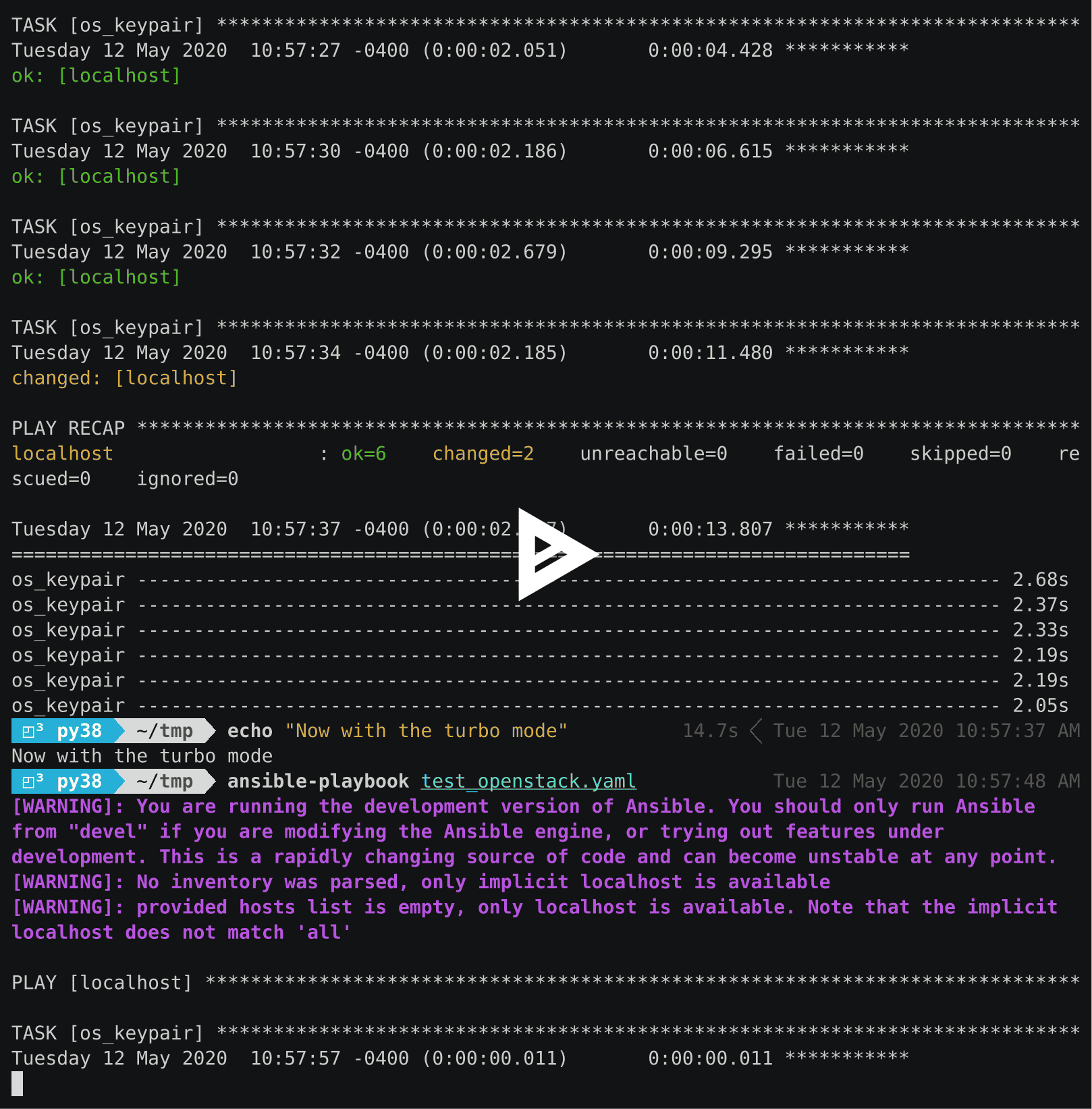
In this demo, we run one playbook that do several `os_keypair`
|
|
calls. For the first time, we run the regular Ansible module.
|
|
The second time, we run the same playbook, but with the modified
|
|
version.
|
|
|
|
|
|
[](https://asciinema.org/a/329481)
|
|
|
|
|
|
### The background service
|
|
|
|
The daemon kills itself after 15s, and communication are done
|
|
through an Unix socket.
|
|
It runs in one single process and uses `asyncio` internally.
|
|
Consequently you can use the `async` keyword in your Ansible module.
|
|
This will be handy if you interact with a lot of remote systems
|
|
at the same time.
|
|
|
|
### Security impact
|
|
|
|
`ansible_module.turbo` open an Unix socket to interact with the background service.
|
|
We use this service to open the connection toward the different target systems.
|
|
|
|
This is similar to what SSH does with the sockets.
|
|
|
|
Keep in mind that:
|
|
|
|
- All the modules can access the same cache. Soon an isolation will be done at the collection level (https://github.com/ansible-collections/cloud.common/pull/17)
|
|
- A task can loaded a different version of a library and impact the next tasks.
|
|
- If the same user runs two `ansible-playbook` at the same time, they will have access to the same cache.
|
|
|
|
When a module stores a session in a cache, it's a good idea to use a hash of the authentication information to identify the session.
|
|
|
|
.. note:: You may want to isolate your Ansible environemt in a container, in this case you can consider https://github.com/ansible/ansible-builder
|
|
|
|
### Error management
|
|
|
|
`ansible_module.turbo` uses exception to communicate a result back to the module.
|
|
|
|
- `EmbeddedModuleFailure` is raised when `json_fail()` is called.
|
|
- `EmbeddedModuleSuccess` is raised in case of success and return the result to the origin module processthe origin.
|
|
|
|
Thse exceptions are defined in `ansible_collections.cloud.common.plugins.module_utils.turbo.exceptions`.
|
|
You can raise `EmbeddedModuleFailure` exception yourself, for instance from a module in `module_utils`.
|
|
|
|
Be careful with the catch all exception (`except Exception:`). Not only they are bad practice, but also may interface with this mechanism.
|
|
|
|
### Troubleshooting
|
|
|
|
You may want to manually start the server. This can be done with the following command:
|
|
|
|
.. code-block:: shell
|
|
|
|
PYTHONPATH=$HOME/.ansible/collections python -m ansible_collections.cloud.common.plugins.module_utils.turbo.server --socket-path $HOME/.ansible/tmp/turbo_mode.foo.bar.socket
|
|
|
|
Replace `foo.bar` with the name of the collection.
|
|
|
|
You can use the `--help` argument to get a list of the optional parameters.
|
|
|
|
|
|
## More information
|
|
|
|
<!-- List out where the user can find additional information, such as working group meeting times, slack/IRC channels, or documentation for the product this collection automates. At a minimum, link to: -->
|
|
|
|
- [Ansible Collection overview](https://github.com/ansible-collections/overview)
|
|
- [Ansible User guide](https://docs.ansible.com/ansible/latest/user_guide/index.html)
|
|
- [Ansible Developer guide](https://docs.ansible.com/ansible/latest/dev_guide/index.html)
|
|
- [Ansible Collections Checklist](https://github.com/ansible-collections/overview/blob/master/collection_requirements.rst)
|
|
- [The Bullhorn (the Ansible Contributor newsletter)](https://us19.campaign-archive.com/home/?u=56d874e027110e35dea0e03c1&id=d6635f5420)
|
|
- [Changes impacting Contributors](https://github.com/ansible-collections/overview/issues/45)
|
|
|
|
|
|
## Release notes
|
|
|
|
See [CHANGELOG.rst](https://github.com/ansible-collections/cloud.common/blob/main/CHANGELOG.rst).
|
|
|
|
## Releasing, Versioning and Deprecation
|
|
|
|
This collection follows [Semantic Versioning](https://semver.org/). More details on versioning can be found [in the Ansible docs](https://docs.ansible.com/ansible/latest/dev_guide/developing_collections.html#collection-versions).
|
|
|
|
We plan to regularly release new minor or bugfix versions once new features or bugfixes have been implemented.
|
|
|
|
Releasing happens by tagging the `main` branch.
|
|
|
|
## Contributing to this collection
|
|
|
|
We welcome community contributions to this collection. If you find problems, please open an issue or create a PR against the [Cloud.Common collection repository](https://github.com/ansible-collections/cloud.common).
|
|
|
|
## Code of Conduct
|
|
|
|
We follow [Ansible Code of Conduct](https://docs.ansible.com/ansible/latest/community/code_of_conduct.html) in all our interactions within this project.
|
|
|
|
If you encounter abusive behavior violating the [Ansible Code of Conduct](https://docs.ansible.com/ansible/latest/community/code_of_conduct.html), please refer to the [policy violations](https://docs.ansible.com/ansible/latest/community/code_of_conduct.html#policy-violations) section of the Code of Conduct for information on how to raise a complaint.
|
|
|
|
## Licensing
|
|
|
|
<!-- Include the appropriate license information here and a pointer to the full licensing details. If the collection contains modules migrated from the ansible/ansible repo, you must use the same license that existed in the ansible/ansible repo. See the GNU license example below. -->
|
|
|
|
GNU General Public License v3.0 or later.
|
|
|
|
See [LICENSE](https://www.gnu.org/licenses/gpl-3.0.txt) to see the full text.
|